
Download SafeShield Calculator – Financial Tool, Loan Payment Calculator, Insurance Premium Estimator, Personal Finance Utility
Overview
SafeShield Calculator is a free financial application developed by Tapp Solutions, designed for Android devices. The software serves as a practical tool for individuals seeking quick and accurate financial estimates without the complexity of full-featured financial platforms. It is particularly useful for users who need to calculate insurance premiums, loan payments, and other financial metrics on the go.
The app targets a broad audience, including students, young professionals, and individuals managing personal finances, offering a straightforward solution for budgeting, financial planning, and goal setting. Real-world usage scenarios include estimating monthly mortgage payments, determining auto insurance costs, and comparing loan terms before making financial commitments. The application is built with a clean, intuitive interface that prioritizes ease of use, making it accessible even to those with limited financial literacy.
The developer did not provide additional details about the company’s background beyond the name. While the app is designed for mobile use, it does not have a desktop version or cross-platform availability. The software is lightweight and does not require significant storage space, making it suitable for devices with limited capacity.
It is ideal for users who want a secure, reliable, and simple financial calculator without the need for a full financial advisor or complex software.
Key Features & Capabilities
- Loan Payment Calculator: Enables users to estimate monthly payments for personal, car, and mortgage loans by inputting principal amount, interest rate, and loan term. This helps users assess affordability and compare different loan options.
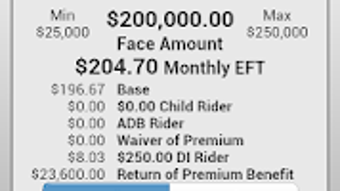
- Insurance Premium Estimator: Provides cost projections for life, health, and auto insurance policies based on user-provided inputs such as age, coverage amount, and policy type. This feature supports informed decision-making when selecting insurance plans.
- Financial Planning Tools: Offers a suite of calculators that support budgeting, savings goals, and debt management, allowing users to track financial progress and set realistic targets.
- Intuitive Interface: Features clear labels, straightforward input fields, and concise output displays, ensuring users can navigate the app without confusion or learning curves.
- Secure Data Handling: Designed with privacy in mind, the app does not collect or share personal information with third parties, ensuring user data remains protected during use.
Each feature is tailored to real-life financial scenarios, such as comparing auto loan offers or estimating insurance costs before signing a contract. The results are presented in a simple format, enabling users to make timely and informed decisions. The app is updated regularly to maintain functionality and security, ensuring compatibility with evolving Android versions. While the developer did not specify technical performance details, the lightweight nature of the software suggests efficient operation on standard mobile devices.
User Interface, Workflow & Performance
The user interface of SafeShield Calculator is clean and minimalistic, emphasizing usability and clarity. Navigation is straightforward, with a well-organized layout that groups related calculators under clear headings. Input fields are clearly labeled, and results are displayed in a concise, easy-to-read format.
The workflow is linear and intuitive, allowing users to enter data, view results, and adjust parameters with minimal steps. This design reduces user fatigue and supports efficient decision-making during financial planning sessions. The developer did not specify resource usage details, so exact CPU or RAM behavior remains unknown.
Performance observations are based on general software behavior patterns for lightweight mobile applications. Stability is assumed to be consistent, given the app’s regular updates and secure design. No reports of crashes or unexpected behavior were mentioned.
The app operates entirely offline, which enhances privacy and ensures functionality without internet dependency. Users can access all features without requiring an active connection, making it ideal for use in low-connectivity environments. Overall, the interface and workflow are optimized for simplicity and speed, aligning with the app’s goal of delivering reliable financial estimates quickly.
Compatibility & System Requirements
SafeShield Calculator is designed for Android devices and is available for download from the Google Play Store. The developer did not provide specific information about supported Android versions or minimum hardware requirements. Compatibility information was partially provided, indicating that the app is intended for mobile platforms.
The installation size is not specified, but the software is described as lightweight and not requiring significant storage space. Exact system requirements were not listed. Users should ensure their device meets general Android compatibility standards for app installation.
No desktop or alternative platform versions were mentioned. The app is optimized for mobile use, with a responsive layout that adapts to various screen sizes. For users seeking desktop alternatives, no official desktop version is currently available.
The developer did not indicate plans for cross-platform expansion.
Pros and Cons
Pros
- Free to download and use with no hidden costs
- Simple, intuitive interface suitable for all user levels
- Offers multiple financial calculators for diverse use cases
- Designed with user privacy and data security in mind
- Regular updates ensure ongoing functionality and security
- Operates offline, ensuring consistent access without internet
Cons
- Limited to Android platform; no desktop or iOS version available
- No detailed system requirements or performance metrics provided
- App functionality is restricted to basic financial calculations
- Does not support advanced financial modeling or integration with banking tools
- Results are estimates and should not replace professional financial advice
FAQ Section
Is SafeShield Calculator available for Windows or Mac?
The software is currently designed exclusively for Android devices. There is no official desktop version for Windows or Mac.
Is the app safe to use and secure?
Yes, the app is designed with security in mind. It does not collect or share personal information with third parties, ensuring user data privacy.
Does SafeShield Calculator require an internet connection?
No, the app operates entirely offline. All calculations are performed locally on the device, ensuring privacy and uninterrupted use.
How often is the app updated?
The app is regularly updated to maintain functionality, security, and compatibility with new Android versions.
What type of license does SafeShield Calculator use?
The software is free to download and use. No license fee is required, and it is distributed under a free-to-use model.
Final Thoughts + CTA
SafeShield Calculator stands out as a reliable and accessible financial tool for individuals seeking straightforward solutions to everyday financial calculations. Its clean interface, privacy-focused design, and broad range of calculators make it an excellent choice for students, young professionals, and anyone managing personal finances. While it lacks advanced features and desktop availability, it excels in simplicity, speed, and security.
The app delivers accurate estimates without overwhelming users with technical details, making it ideal for quick decision-making on the go. For those who value a lightweight, secure, and free financial utility, SafeShield Calculator offers a compelling solution. Download SafeShield Calculator now and take control of your financial planning with confidence.







